A pattern is one repeat of tiles, drawn as an SVG. TessaFab copies it side by side over the whole assembly, so the same pattern works on any model. Your own patterns are free in every edition.
There are two ways in:
- New pattern (under Yours in the gallery) opens the pattern editor, starting from a simple brick pattern.
- ⋯ → Make my own from this… opens the editor on a copy of the pattern you have chosen.
The pattern editor
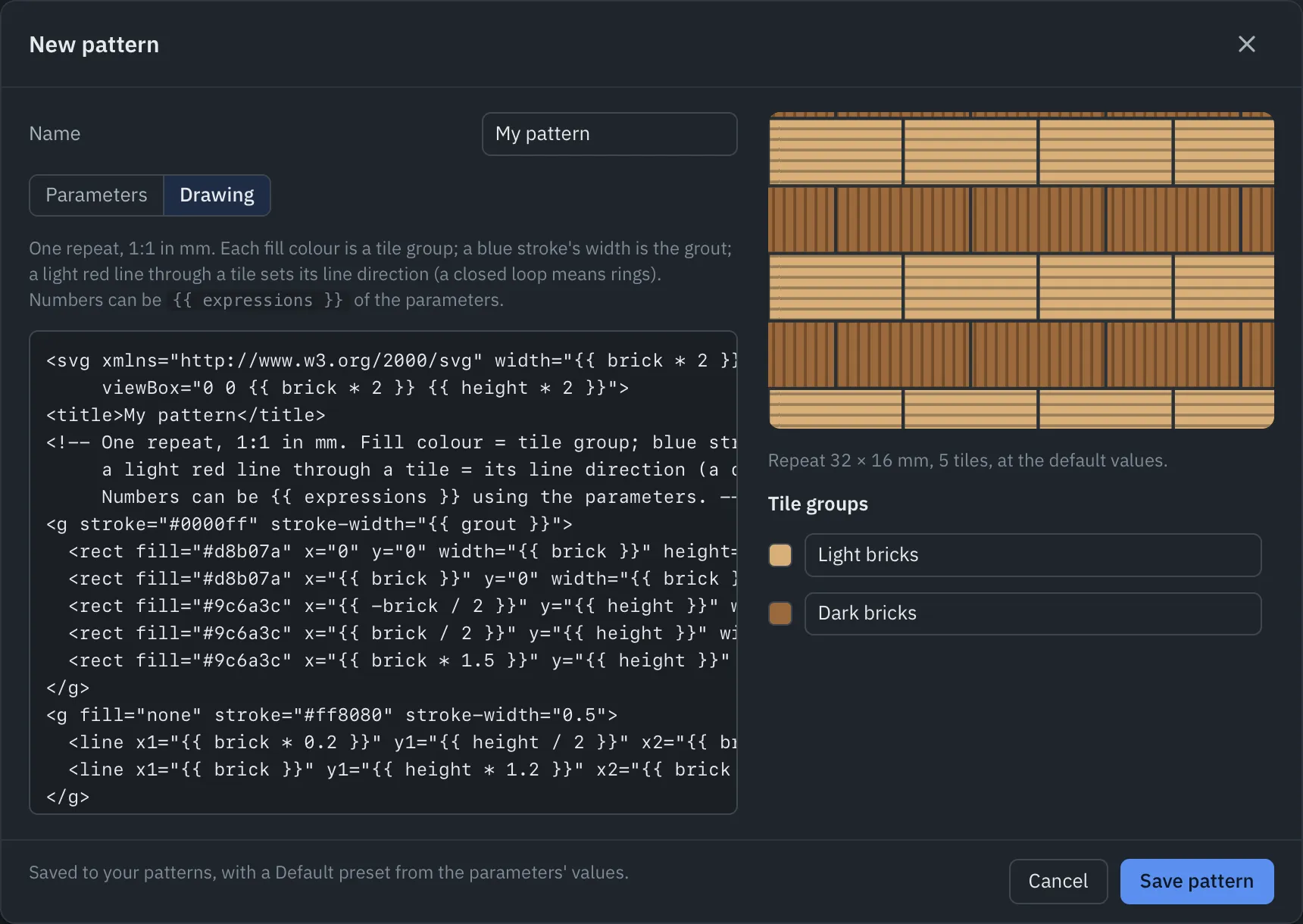
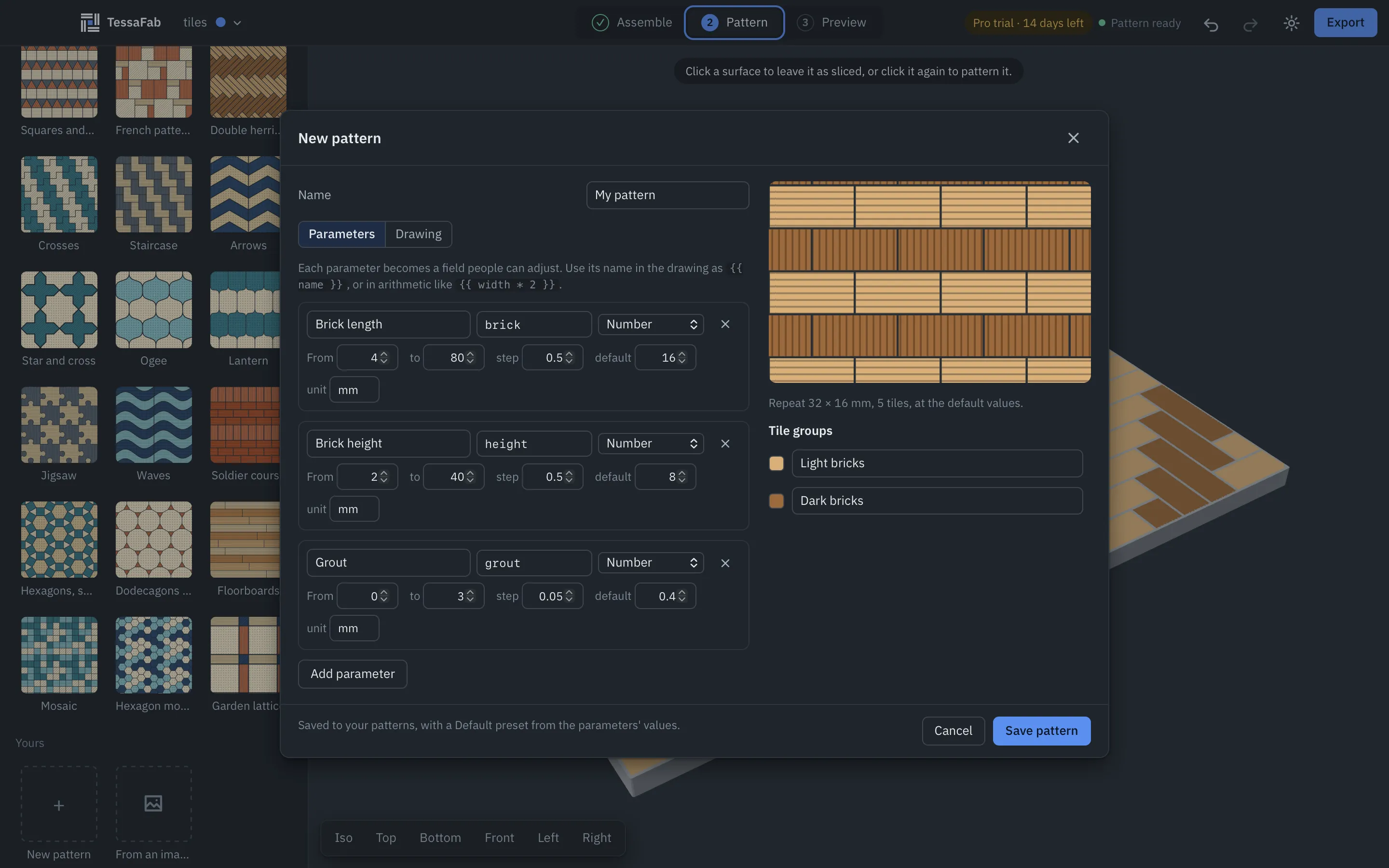
- Name: what the gallery calls it.
- Drawing: the SVG of one repeat. The preview beside it redraws as you type, with the repeat’s size and number of tiles.
- Parameters: the values people can adjust (below).
- Tile groups: a name for each fill colour, shown in the line direction and colour settings.
Save pattern adds it to your patterns, with a Default preset from the parameters’ values.
How the drawing is read
The SVG’s page is exactly one repeat at 1:1 in millimetres: it’s copied every page width across and every page height up. Draw each tile once; a tile may hang over the page edge, and the copy next to it fills in the other side.
The colours tell TessaFab what each shape is:
| In the drawing | Meaning |
|---|---|
| Any fill colour | A tile. The colour is its tile group. |
Blue stroke (#0000FF) |
Grout: a groove as wide as the stroke. Draw it along the tile edges. |
Light red stroke (#FF8080) |
The direction of the lines in the tile it’s drawn in. A closed red loop (a small circle) means concentric rings instead. |
| Black stroke on an unfilled shape | Only in a layout: the outline of one piece. A black edge on a filled shape is ignored. |
Colours don’t have to be exact: anything near black, clearly blue or clearly red or pink counts.
One red line per colour is enough. A tile without its own red line uses the direction of the tiles of the same fill colour that have one, so a pattern of hundreds of tiles in three colours needs three red lines. A red line in one particular tile overrides its colour’s direction for that tile only. Tiles with no red line anywhere in their colour run along their long axis.
What the reader understands
Paths (all commands, arcs and curves), rectangles (rounded too), circles, ellipses, lines, polylines, polygons, groups and layers, transforms, <use> clones, style attributes, CSS classes. Hidden layers and fully transparent shapes are skipped.
Text, images, clip paths, masks and pattern fills are ignored: convert text to paths and expand pattern fills into real shapes first. Any vector editor works; Inkscape is the most reliable.
Parameters and expressions
Each parameter becomes a field people can adjust: a Number (with a unit, a range and a step), a Choice, or Yes / no. Use its name in the drawing inside double braces:
<rect fill="#d8b07a" x="0" y="0" width="{{ brick }}" height="{{ height }}"/>
<rect fill="#9c6a3c" x="{{ brick / 2 }}" y="{{ height }}" width="{{ brick }}" height="{{ height }}"/>
<svg width="{{ brick * 2 }}" ...>
Expressions can use numbers, the parameters, + - * / // % **, comparisons, not, and, or, a if cond else b, the functions sqrt, sin, cos, tan (in degrees), abs, min, max, round, floor, ceil, int, and the constants pi, sqrt2, sqrt3, true, false. Nothing else, so a pattern can’t run code.
Under the hood the parameters are a Form.io form. A pattern file can carry a richer form (with conditions and panels), which the editor keeps as it is.
Where your patterns live
Your patterns and presets are kept in the app’s data folder, in patterns/: one SVG per pattern, with its form in a <metadata id="tessafab">, and presets.json (Files and folders). Share them as pattern packs.
A pattern file can also be used directly by a project ("pattern": {"file": "path.svg"}); every provided pattern is in the repository’s patterns/ folder as an example.